
Outils pour utilisateurs
Panneau latéral
Ceci est une ancienne révision du document !
Table des matières
 Cette page n'est pas encore traduite entièrement. Merci de terminer la traduction
(supprimez ce paragraphe une fois la traduction terminée)
c:geo contacts plugin
Il s’agit d’un plugin de contacts pour c:geo. Il ne fonctionnera que si l’application c:geo est installée et vous permet d'accéder directement à vos contacts lorsque vous appuyez sur un nom d’utilisateur dans c:geo.
La raison pour laquelle cette fonctionnalité est proposée sous forme de plugin plutôt que directement intégrée à l’application principale c:geo est que les anciennes versions d’Android ne pouvaient afficher les demandes d’autorisation qu’au moment de l’installation, et non pendant l’utilisation. Comme la demande d’autorisation d’accéder aux contacts de l’utilisateur n'était pas forcément facilement compréhensible pour certaines personnes, nous avons décidé de séparer cette fonctionnalité dans un plugin dédié. Ainsi, les utilisateurs intéressés par cette fonction — et donc susceptibles de comprendre la demande d’autorisation associée — peuvent l’utiliser, tandis que les autres ne sont pas dérangés par cette demande.
Cependant, Android prend désormais en charge les autorisations pendant l’exécution, et nous pourrions donc décider de réintégrer dans le futur cette fonctionnalité dans l’application principale.
Installation
Vous pouvez télécharger et installer le plugin c:geo contacts depuis Google Play.
Après l’installation, il n’apparaîtra pas comme une icône ou une application distincte sur l'appareil : le plugin s’intègre directement dans c:geo et ajoute la fonction d’accès aux contacts lorsque vous appuyez sur un nom d’utilisateur.
Usage
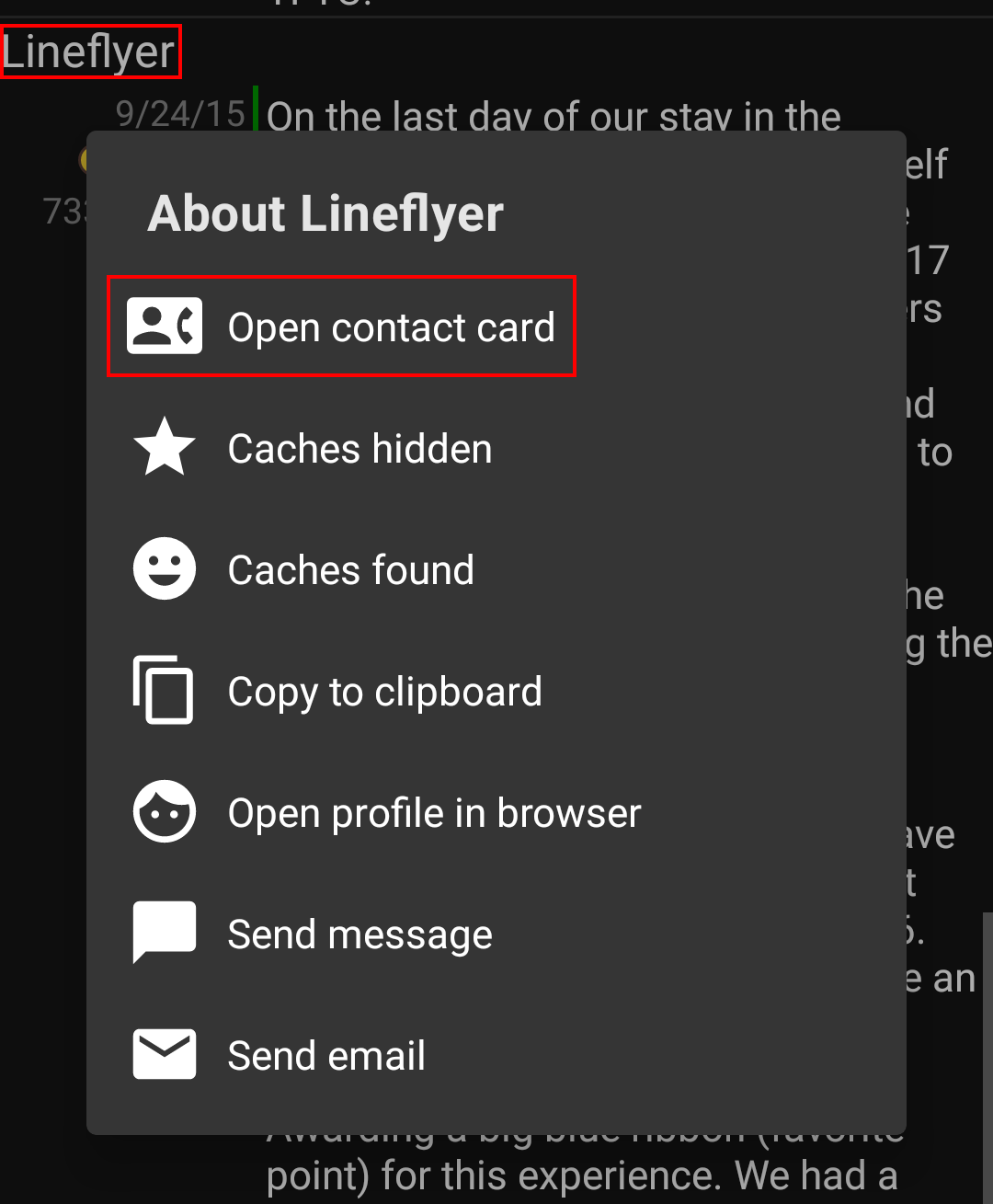
When you tap on a username at various places in c:geo (e.g. in the cache logbook) the menu will contain an item to open the corresponding contact card in your phone contacts. This will allow you to directly call or message the user.
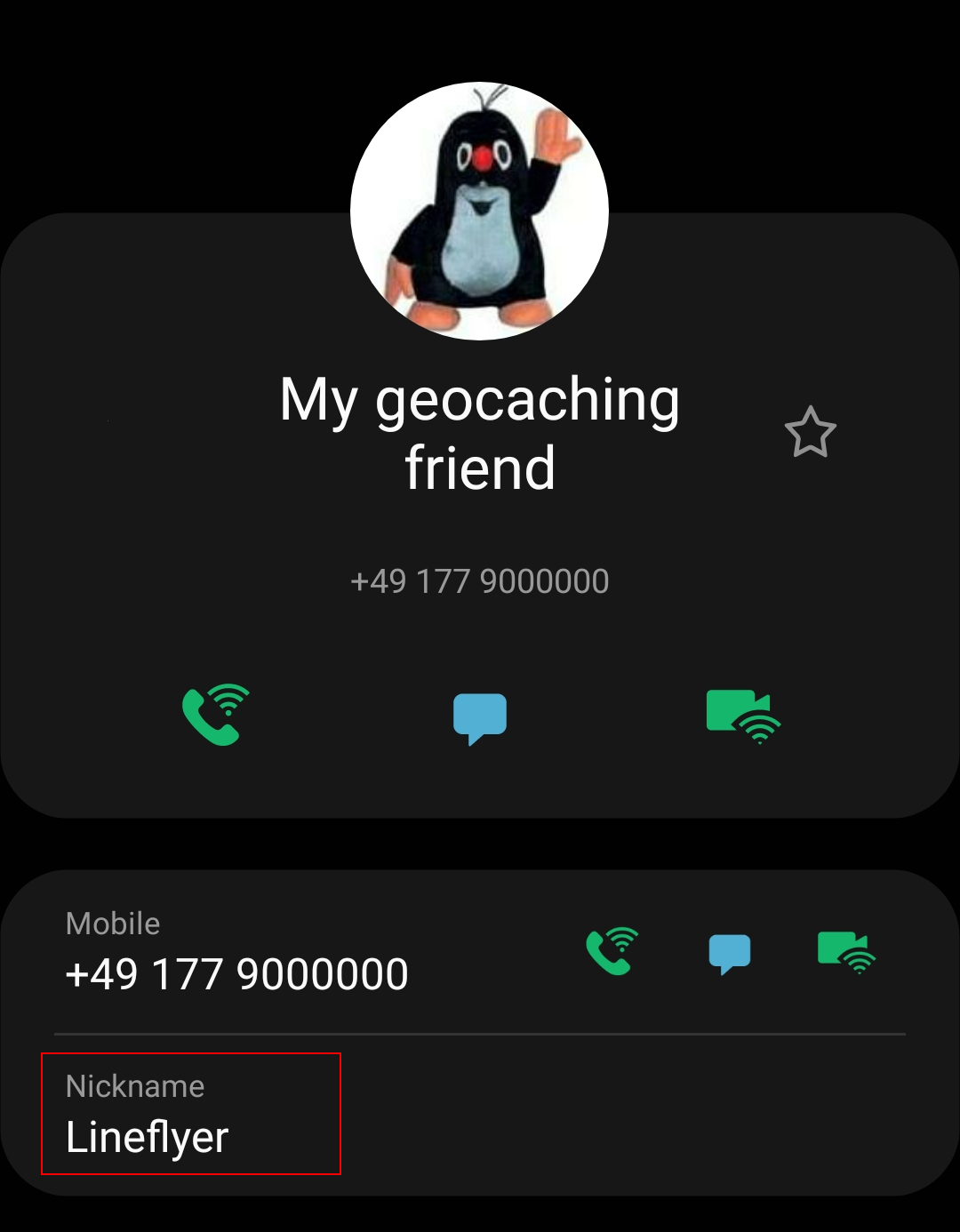
In order for this function to match, the username of the person needs to be stored in the Name or Alias/Nickname field of your contact. Please make sure you stored the geocaching name of the person like it is shown in c:geo into one of these fields of the matching contact.
Alternatively the plugin will also try to match if the geocaching name equals the full name stored in your contacts list.
Data privacy statement
What information is collected by the c:geo contacts plugin?
The contacts plugin needs the permission to access the contacts on your device. It will access your contacts in order to be able to find the contact data of other geocachers. The c:geo contacts plugin will access your contacts only on your demand if you select the menu item “Open contact card” in c:geo. As long as you don’t use that function the plugin will never access any data of your contacts.
How is the information used by the c:geo contacts plugin?
After you select Open contact card the c:geo contacts plugin will read your contact data to find a possible match of the geocachers name in the name or nickname field of your contact data. It will neither write to your contact data nor store any of your contact data within c:geo or the c:geo contacts plugin itself.
Avec qui ces informations sont-elles partagées ?
Vos données de contact ne seront ni copiées dans c:geo, ni partagées avec des tiers.


